
Texture Formats and Compression in Games
The other day, a thread about the ever-growing size of modern games touched on the topic of textures. As it happens, I’ve asked myself this question many times, and along the way built my own 14th format for storing them, so I want to share a short overview of the problems involved, along with some of my own work. Unfortunately I sat on this article for far too long, so some of what’s described here may be fairly outdated by now.
So, Her Majesty the texture. She’s like the queen on a chessboard: responsible for most of a game’s visual representation, and considerably more capable than the king of 3D graphics — the model. Depending on the artist’s whim, textures can have transparency or not, can contain vector data (normals, distance fields), and the artist may also demand that a texture be displayed either completely without quality loss, or with losses invisible to the eye. Naturally, they won’t get into implementation details — all they care about is that it works, and preferably works on mobile, desktop, and consoles all at once. That burden falls on the programmer’s shoulders, and if you don’t dig too deep into the details, you can simply run the texture through a utility supplied by the engine (a Photoshop plugin, a web compressor, texturetool from the XCode toolset, etc.). Or you could even just save it as JPEG or PNG and use it as-is. Fortunately, modern GPUs can handle non-square textures, and engines know how to import JPEG and PNG. I’ll explain below why this isn’t quite correct or efficient.
To make things really complicated, textures can also be 3D, multi-layered, and contain half, single, or double precision floating-point numbers. For environment effects, cube textures (6 faces of a cube) and spherical textures may also be used, along with HDR and sRGB. I won’t go into these extremes here — that’s a topic for separate articles.
A Bit of Theory
During rasterization, the GPU shader needs access to any part of a texture without extra overhead. If a texture is stored uncompressed, the texel’s index in memory can be computed directly from its coordinates. If block compression is used — say, 4×4 blocks — the whole block can be read by simply dividing the coordinates by the block size, and then unpacked in minimal time. Variable-length coding (LZW, Huffman, and the like), on the other hand, doesn’t allow random access, so such images have to be unpacked entirely before loading. That’s exactly why GPUs don’t work directly with PNG and other such textures — that job is easier to do on the CPU, and it also parallelizes poorly. With JPEG or WEBP we only save on disk space, while losing quality and decompression speed for the texture.
There’s a separate problem with Mip Maps — downscaled versions of a texture. They’re used everywhere to correctly display a texture when it’s minified (for example, when an object is far away), and to avoid spending resources on expensive interpolation on the GPU. Mip Maps also require artificial gamma correction or a contrast boost, because simply shrinking an image by a factor of 2^n with bilinear interpolation can noticeably degrade it.
In any case, common formats like PNG, JPEG, TGA, EXR, and others simply don’t support storing Mip Maps, so if you use such textures in a game you either have to load each Mip Map from a separate file, generate them on the fly, or not use them at all. Frankly, none of these options are great, which is why containers were developed for games that store all mip levels at once, with the texture data kept in a form ready to be loaded straight into video memory.
A few words on how block compression works. A texture is split into small fragments — say, 4×4 pixels — and then all the pixels in a block are analyzed to derive a set of rules for reconstructing them. In one of the simplest formats, DXT1 (also known as BC1, developed by S3 in the early 2000s), two colors are stored in RGB565 format, and two more are derived from them by blending in a 2:1 ratio (c2 = 2/3 * c0 + 1/3 * c1 and c3 = 1/3 * c0 + 2/3 * c1); then a 2-bit index per pixel selects one of these colors c0, c1, c2, c3. In this form the whole block takes up 64 bits (16 + 16 + 2 * 16), which is very economical for storage, but it immediately explains the quality loss — if a block contains 16 unique colors, only two of them get preserved (with slight distortion), while the rest are replaced with intermediate colors between them. In practice, though, this works acceptably well, and it’s no exaggeration to say that DXT1 has been the most popular format in video games for almost two decades now. If you really want to, you can even decompress such a texture in a pixel shader when the GPU doesn’t support it natively — on Android, for instance. But you probably shouldn’t.
Textures Without Transparency (RGB), Lossy
The most common type of texture — no transparency, where minor quality loss isn’t critical, roughly as with JPEG images. This covers photorealistic textures of wood, stone, and so on, as well as hand-made textures of spaceships, skin, and pretty much anything you can imagine. The situation here is simple: every platform has had formats for these for years, giving acceptable quality at 2 to 4 bits per pixel (2 bits for PVRTC, 4 bits for BC1/DXT1 and ETC1). That means for a 4096×4096 image, compression gets you a file of 4,194,304 or 8,388,608 bytes — a 12x or 6x reduction depending on the format (sometimes people quote 16:1 or 8:1 compression, but the catch is that’s measured against RGBA, where the A channel is simply dropped).
All of these codecs reduce the color space from RGB888 down to RGB565 or 555, which produces various color distortions. And the block-based algorithms themselves add a fair amount of artifacts at block boundaries. This is very often critical for line-art style drawings, anime for example. Gradients are also strongly prone to distortion.
Real-time YCoCg-DXT compression (ResearchGate)
Back in 2007, the folks at id Software came up with an interesting trick: store an RGB texture as YCoCg, the same way H.264 video does. This can be done with any format, but you already get pretty good results with DXT5 (BC3). The luma component (Y) is stored in the green or alpha channel, and the chroma components in the others. When unpacked in the shader they’re converted back to RGB, giving higher quality than DXT1 at twice the storage cost.
I want to talk separately about the PVRTC 2bit format. It’s unique in that, before ASTC arrived, it delivered an incredible 12:1 compression ratio, at a time when every other format produced a file twice as large at comparable quality. The PVRTC family as a whole uses an unusual approach: two images are stored at 1/4 resolution in RGBA4444 format, and then, for each block, information is stored on exactly how to blend those two images together with modulation. In theory, on an unsupported device you can very quickly extract the downscaled 1/4 texture from this format and use that instead. Or you can decode it on the CPU or GPU. PVRTC 2bit itself uses 8×4 blocks, and its variant PVRTC2 2bit is supposed to give even better image quality than the first version of the standard.
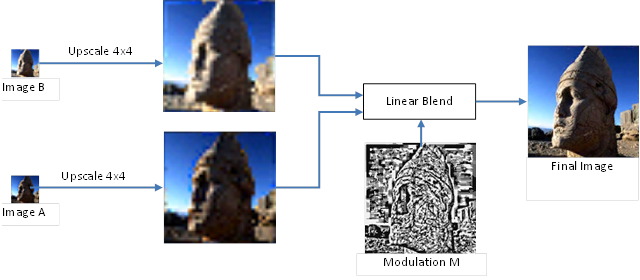
I confess, I once even wrote a rough decompressor in C++ using SSE/ARM Neon to unpack PVRTC 4bit, for use in my own projects. Before it’s completely obsolete, I’ll put it up on GitHub, in case anyone needs something like it.
Unfortunately, the format was very poorly documented, and starting from a certain version, Imagination’s own PVRTexTool utility stopped using the highest-quality option, causing the PSNR of the images to drop. The format is still used on iOS today, but a large-scale migration to ASTC has already begun.
Textures With Transparency (RGBA), Lossy
This type of texture is also fairly straightforward. Every platform has a solid format for storing them, with compression ratios ranging from 8:1 to 4:1, with some variation. On PC, DXT5 (also known as BC3) and DXT3 dominated for years — essentially DXT1 with an extra 2 bits per pixel for transparency. Now there’s a gradual migration toward BC7, but more on that a bit later.
On mobile there was, for a while, a whole zoo of formats, several per GPU vendor, but over the last few years things have gradually standardized: on Android the winner turned out to be ETC2/EAC, which made it into the OpenGL ES 3.0 standard. On iOS you can now use both ETC2 and PVRTC. All of these formats are lossy, but the codecs keep improving and overall texture quality ends up quite decent. Mobile devices also get refreshed much faster than desktops, so future technology (meaning ASTC) arrived on them much earlier. But more on that shortly.
The Mobile Format Wars of the 2010s
In the early 2010s, mobile devices started supporting fairly complex 3D games, and the question of texture formats came up sharply. At the time, OpenGL ES 2.0 guaranteed only the ETC1 format, but for higher quality and transparency, every GPU vendor picked its own combination of texture extensions:
- Qualcomm Adreno supported ATITC/ATC and 3DC — GL_AMD_compressed_ATC_texture, GL_ATI_texture_compression_atitc, GL_AMD_compressed_3DC_texture
- PowerVR supported PVRTC — GL_IMG_texture_compression_pvrtc
- NVidia Tegra supported S3TC — GL_EXT_texture_compression_s3tc, GL_EXT_texture_compression_dxt1
- Qualcomm Adreno from the 3xx series onward supported ASTC (5 years before it was added to the standard!) — GL_KHR_texture_compression_astc_ldr
- Various vendors may or may not have had hardware support for paletted textures, but almost everyone supported the extension itself, making it a universal fallback option — GL_OES_compressed_paletted_texture
- Mali from the 6xx series had support for ETC2/EAC — GL_ARB_ES3_compatibility
Each format had its own different compressors, with their own settings and dependencies.
On Android you could build different APKs for the same game and specify in the manifest which texture format each one supported. See Android’s multiple APK texture support guide.
It’s easy to imagine what a hell “fix a couple of pixels on an image” turned into, when it meant building 6 different versions and testing all of them. And if a device supported several texture formats, it was easy to make a mistake in testing and check the same build twice while never testing another one at all.
Fortunately, with the release of OpenGL ES 3.0 — or rather, about 7 years after it, once every GPU vendor had finally made peace with and accepted the standard — it became possible to support just ETC2/EAC everywhere, and gradually migrate to ASTC with version 3.1.
Textures With Vector Information
This category covers normal maps, distance fields, and other vector data stored in raster form. Here compression can produce significant artifacts, so modern methods try to preserve as much of the original vector as possible. For normal maps, the vectors are three-component and normalized, so the third coordinate can be dropped and reconstructed from the other two, while for distance fields, in general, a single channel is enough. If you use the DXTn format — the hack of storing two components of the normal in the Green and Alpha channels — you get 6-bit color precision at 4 bits per pixel. In specialized formats like ATI2N/3Dc, you get 8-bit precision at the same size. And if quality is critical, all that’s left is to use uncompressed formats, including storing the vectors as floating point. On mobile things are a bit worse for normals, because support for ATI2N/3Dc isn’t very widespread, DXTn and S3TC aren’t available on all devices, and other formats aren’t very tolerant of vector data. Essentially, only ASTC has a mode specialized for normals.
Distance Fields
Back in 2004, Valve published a groundbreaking paper on Signed Distance Fields — a technique that let them render single-color logos with the ability to scale up infinitely (sic!), while storing them in 64×64 textures. Essentially, this is a vector image encoded in raster form, with all the consequences that entails: fonts and logos can be stored this way, there’s work on rendering Bezier curves, and I even managed to build 255-color vector maps using distance fields. But that’s a topic for a separate article.
Future Technologies (by 2020, Already Current)
About 5-6 years ago I was looking enviously at new formats that were supposed to solve all the problems described above — on desktop, BC7 appeared (also known as BPTC, part of the Direct X 11 standard, supported on OpenGL, Vulkan, Metal), which lets you store images in a block format compressed down to 4 bits per pixel, with precision ranging from RGB444 to RGBAP77771 (the last bit is shared across the whole block and gives an RGBA8888 color depth). On mobile, meanwhile, came the ASTC format, starting with OpenGL ES 3.1. It can store data with or without transparency, plus vector data, HDR, and much more. And all of that at sizes ranging from 8 bits per pixel down to 0.89 (!!) at decent quality.
The fly in the ointment is that simple tests of these fantastic formats show, first, that some GPUs still don’t support them*, and second, that the quality still isn’t perfect. However good BC7 is, an ordinary gray gradient still trips it up, and ASTC at its very best mode and quality gives a PSNR noise level of up to [to be calculated]. That’s far from Lossless, but either way, these two formats are the future, and further codec improvements together with less demanding artists will allow exactly these two formats to be used in future games. Personally, I recommend using BC7 for all compression on desktop, and ASTC on mobile.
For the faint of heart, I recommend stopping here, because what follows is heresy, experiments, and dirty code.
* I’d like to separately mention Apple, which capped OpenGL on macOS at their own modified version 4.1, eliminating the ability to use BC7 and the ARB_texture_compression_bptc extension under OpenGL. Want BC7? they say — switch to Metal. Never mind that it’s a completely different technology, and that, according to Steam’s data, only 0.63% of players game on macOS.
One Ring Format to Rule Them All
A rather interesting experiment is being run by Binominal LLC. These folks are developing their own compressed format and a library called Basis, which can very quickly convert a texture on the fly into BC1-7, ETC2, PVRTC, and ASTC. This way you can store a single texture on disk for all platforms, and during the loading screen magically turn it into whatever format the user’s device supports. This approach has only three drawbacks: decompression speed (it’s far from zero), the fact that the solution is paid, and different images/behavior across different devices. Indeed, during testing we can’t reliably know how the user will actually see the game or how long textures will take to decompress, since their device is bound to have different specs than the developers’. The low-quality version of this technology is integrated into Unity, where it’s called Crunch compression: Unity’s Crunch Compression documentation.
Separately interesting is a high-quality format called UASTC, which is transcoded on the fly into BPTC (BC7) or ASTC depending on the platform. Unfortunately I can’t verify the speed and quality of this format myself, but it sounds promising. Binominal LLC is also part of the GLTF committee at Khronos Group, and their approach may well become a standard someday.
On top of that, Binominal is developing a genuinely amazing compressor for block formats that I can’t help but recommend: BinomialLLC/crunch on GitHub.
During compression it evaluates interactions between neighboring blocks, varying the methods used to pick key colors in order to minimize PSNR. It also supports the YCoCg texture format. For BC1-5 and ETC1-ETC2, it gives the best quality of any compressor I’ve come across.
Textures Requiring Maximum Quality
Sometimes an artist may put down a hard requirement that a texture must not be compressed at all. This applies to gradients, UI elements, fine line art, sometimes normals, and often complex multi-channel distance fields. This is where the real trouble starts for the programmer and the engine.
The first logical impulse is to use the PNG format for all such textures. But as I wrote above, that requires decompressing the image on the fly before loading it into video memory. If Mip Maps are needed, and they’ve been carefully generated and corrected by special utilities, then loading a single 4096×4096 image in PNG format turns into sequentially reading 9+ files, decompressing about 90 megabytes of data, and loading that into video memory. If you do this “on the fly,” on the main thread, during gameplay at a 60Hz frame rate, all of these operations need to complete in under 16 milliseconds to avoid a noticeable stutter. Or you load textures during a loading screen. Or you do the reading and decompression on background threads, then pass pointers to the main thread and upload to video memory. With this approach you can also implement progressive texture loading — process the lowest Mip levels first, then load in the higher ones afterward. This works great for distant objects, which don’t need the high-resolution Mip Maps right away anyway.
The other extreme is to keep all 90 megabytes in one pre-baked file and read it straight off the disk without any decompression. Say you have an SSD with a 180MB/s read speed — then this operation takes just 500 milliseconds. And of course, you can imagine what happens with an HDD at 30MB/s, and how long loading such a texture would take.
A reasonable solution is to keep all 90 megabytes in an archive (GZip, LZ77, or whatever else) and decompress it in the background, giving a balance between disk size and decompression load. The only problem is that background loading isn’t always acceptable, and it becomes hard to do partial loading, since all the data sits in a single archive.
A fairly good option is to use 8-bit paletted images. If the UI uses something like Material design, it can easily turn out that the whole texture contains no more than 256 colors. In that case there’s the OpenGL format GL_PALETTE8_RGBA8_OES, supported on all mobile devices, and in an ideal world everything should be great — on disk the texture would take up 8 bits per pixel plus a 1024-byte palette. That’s around 21 megabytes for a 4096×4096 texture with Mip Maps, which is generally acceptable. But in reality, many GPU vendors implemented this format just to check a box, and at texture-load time they convert it to RGBA8888 with noticeable lag. I should also mention that on desktop, this format is far from supported by every GPU, and the final nail in the coffin turned out to be that in real life, 256 colors “isn’t enough for everyone.”
At this point I decided that the existing options and formats didn’t satisfy me, and started writing my own format that would quickly load and unpack data on the fly. My first attempt was a 16-bit palette, along the same lines as the 8-bit one. It gives 65535 colors, at a disk size of 16 bits per pixel — that is, 45 megabytes for a 4096×4096 texture. Plus it has to be converted to RGBA before loading, which is far from free.
(this article was never finished, but published as is).