
The Story of a Reinvented Wheel
 Programmers sometimes reinvent their own “wheels,” but is that really such a bad thing, especially when the result is indistinguishable from the original and the author walks away with invaluable experience?
This story began a bit over a year ago, when my wife got a modern smartphone. She asked me to find a Solitaire (“Klondike”) game just like the one that used to ship with desktop Windows. After looking through a dozen apps, I was unpleasantly surprised — almost all of them had awkward controls, questionable card artwork, and a pile of extra bells and whistles like 250 solitaire games in one, setting a photo as the card back, or blackjack with scantily-clad dealers. In the end we picked one of the more decent options and forgot about it for a while.
A year went by and I started writing mobile apps. Cross-platform support, debugging in-app purchases, and preparing content for different platforms quickly became pressing issues. I considered doing a “Tetris” or yet another calculator as a warm-up project, but in the end I picked Solitaire as my “wheel.” The guiding idea of the project was to reproduce the good old solitaire from the Windows game pack as faithfully as possible.
Content
 The first problem was the artwork: the internet is full of card images, many of them free, but almost all of them are overly ornate, sit awkwardly on mobile screens, and simply don’t resemble the old cards from cards.dll. The Windows cards were drawn pixel by pixel by the talented designer Susan Kare back in 1989, in 16-color mode. You can easily find them online if you want, but using them would likely infringe on someone’s IP. Much more interesting were the cards used in some Linux-world games — distributed under the GPL license, though they looked a bit odd, with black-and-white face cards. The author of these cards turned out to be a certain Oxymoron; his site has the images themselves along with the build script. He drew his own pip numbers and suit icons, and took the face cards from an unknown source, though they’re fairly close to the original. I tweaked the script a bit so it would save the cards as PNG, added transparency, and hand-colored the face cards myself. For the ace-of-spades icon I drew my own stylized image, echoing the original with something like a Celtic knot pattern. That same image became the app icon.
For the card back I picked the image I liked best — a beach with a hand-drawn palm tree. It came out very recognizable — your eye doesn’t linger on it, though if you look closely the difference is obvious.
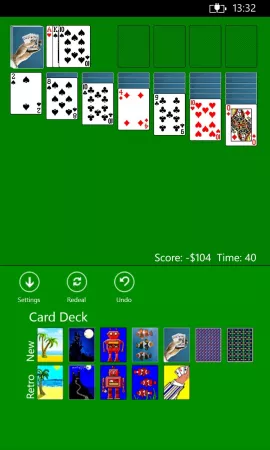
Gameplay
 As it turned out, Solitaire’s gameplay isn’t as simple as it looks, once you factor in scoring, the timer, dealing one card versus three, and Vegas mode. For example, playing for money with single-card deals (i.e. no way to cycle back through the deck) differs noticeably from the standard rules: the goal is to move as many cards to the foundations as possible and earn more than $42, so you come out of the red and can start the next round even if that deal didn’t work out. In the scored mode, moving a card from the stock “down” to the tableau and then up to a foundation earns 15 points, while moving it straight to a foundation only earns 10. Naturally none of this is documented in any reliable way, so I had to run the original game under Wine and do a proper investigation.
Code
I wrote the app’s business logic in plain Java 1.6, without any third-party libraries, Android, Swing, or anything like that. For Android, this part builds as a separate library and plugs into the GUI project without much trouble, but for the other OSes I decided to take an unconventional path rather than doing a straight port to other languages. After some manual tweaking, the Sharpen project managed to convert this code into clean C#, which opened the door to an iOS implementation via MonoTouch, and later Windows Phone 7/8 as well. Simple unit tests showed the logic hadn’t changed and the translation went smoothly. In MonoTouch I implemented the GUI without much trouble, debugged the game on the emulator and on an iPod Touch, and submitted it to the iTunes Store for approval. I implemented the app’s settings via an external binding to KGN.InAppSettings, tripping over a few minor issues along the way, like the lack of thumb support for external libraries.
Problems
 After a week of Apple review, my “Classic Solitaire” appeared in the iTunes Store. I expected criticism of the artwork or possible licensing disputes, but on day one every single review said the same thing: the game crashes right on launch. I pulled the game from the store and started digging into the problem. It ran fine for everyone I knew, and neither the emulator nor my iPod Touch 4G showed any crashes. It took a few days and help from forum members to find the first serious bug: in iOS’s regional settings, some locales use a period as the decimal separator while others use a comma. As a result, converting a float to a string worked on some devices and crashed on others. Within a week of resubmitting for review, it turned out the game also crashed when launched in landscape orientation. On iPod and iPhone every app starts in portrait, so this only showed up on iPad, which I didn’t own. Re-review took another week, during which the game completely dropped out of the “New” category and sank well below the Top 1000. On top of that, the icon with a transparent background, which Android Market accepted just fine, got mangled by Apple’s processing scripts and ended up looking downright ugly.
High-definition
 By the time the project was working properly and the icons and everything else had been fixed, I got a new iPad, where I discovered that the card resolution was clearly not enough for a 9.7″ screen, and on the Retina Display the “jumping cards” animation was noticeably choppy. Fighting the lag took a couple of days, during which I got thoroughly acquainted with Core Animation, and to improve the resolution I ended up hiring a designer. The result of their work was high-resolution numbers, letters, and suit icons that matched the original style as closely as possible. I scaled up the face cards using Photo Zoom Pro to preserve the authenticity of the pixel art. It didn’t come out perfect, but it turned out pretty well.
A fair amount of effort went into this work, so it made sense to release it as a separate HD version, and also add an in-app purchase to the regular version. Implementing In-App Purchases under MonoTouch turned out to be less than straightforward, and to make it feel cohesive I decided to drop KGN.InAppSettings and build a single unified interface for settings and purchases. I won’t go into the technical details here, but there were quite a few, including the tedious work of building my own Settings screen identical to the system one, wrestling with the lack of documentation for StoreKit under Mono, various purchase-debugging bugs, and so on.
Payoff
The game didn’t turn into a masterpiece, it didn’t make any top charts, and it probably won’t earn back the cost of development and the designer’s work, but at least now I have Solitaire on every one of my devices (including the very smartphone that started all this), as close to the original as possible — the one that’s felt like home ever since Windows 3.1. The experience of writing portable code in Java and porting it to C# turned out to be absolutely invaluable — my team has since used the same approach to port several large Android projects to iOS, and debugging on a small game like this let me learn a lot about the pitfalls of MonoTouch and iOS development in general, while also producing a handful of useful libraries along the way. Some people might laugh at this story, but as far as I’m concerned, the “wheel” came out pretty solid, and the time was well spent.
Post Scriptum
I deliberately avoided going into detail about porting and working with MonoTouch, because each of those topics deserves its own article. Sooner or later I’ll get around to it and publish my In-Game Settings class, purchase manager, and so on for public scrutiny.
I’m not posting a link to the project so it doesn’t come across as an ad.
If anyone needs the updated card-generation script, email [email protected] — it’s a derivative work of the GPL project, so I’m happy to share it.
Originally published on Habr, 2012-07-26.